Network Topology is the schematic description of a network arrangement, connecting various nodes (sender and receiver) through lines of connection. Now let's discuss 7 types of network topologies:

1. BUS Topology
Bus topology is a type of network topology in which all devices (computers, servers, printers, etc.) are connected to a central communication medium, known as a bus or backbone. In a bus topology, a single cable runs through the entire network, and all devices share this common communication channel.
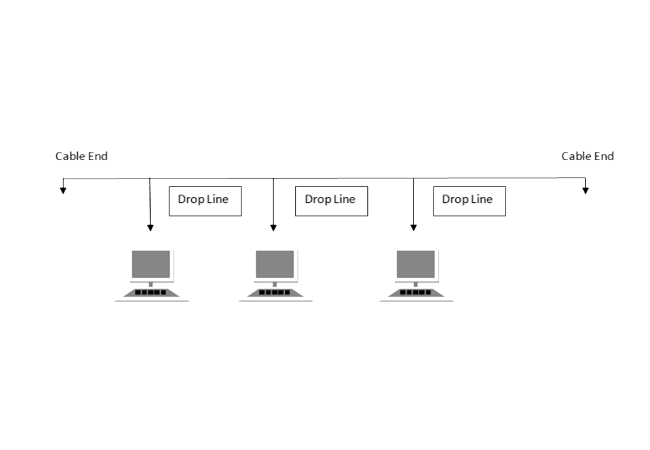
Features of Bus Topology
- In a bus topology, there is a single communication channel (the bus), and all devices are connected to it.
- The ends of the bus must be properly terminated with terminators to prevent signal reflection and ensure the integrity of the transmitted data.
- Bus topology is relatively easy to install and requires less cabling compared to some other topologies.
- Data is transmitted in both directions along the bus, and devices take turns transmitting data.
| Advantages | Disadvantages |
|---|---|
| i. It is cost effective. | i. Cables fails then whole network fails. |
| ii. Cable required is least compared to other network topology. | ii. Cable has a limited length. |
| iii. Easy to expand joining two cables together. | iii. If network traffic is heavy or nodes are more the performance of the network decreases. |
| iv. It is easy to understand. | iv. It is slower than the ring topology. |
2. RING Topology
Ring topology is a type of network topology in which each network device is connected to exactly two other devices, forming a single continuous pathway for signals through each device—a "ring." Data travels in one direction around the ring until it reaches its destination or encounters a repeater, which regenerates the signal and allows it to continue around the ring.

Features of Ring Topology
- A number of repeaters are used for Ring topology with large number of nodes, because if someone wants to send some data to the last node in the ring topology with 100 nodes, then the data will have to pass through 99 nodes to reach the 100th node. Hence to prevent data loss repeaters are used in the network.
- The transmission is unidirectional, but it can be made bidirectional by having 2 connections between each Network Node, it is called Dual Ring Topology.
- In Dual Ring Topology, two ring networks are formed, and data flow is in opposite direction in them. Also, if one ring fails, the second ring can act as a backup, to keep the network up.
| Advantages | Disadvantages |
|---|---|
| i. Transmitting network is not affected by high traffic or by adding more nodes. | i. Troubleshooting is difficult in ring topology. |
| ii. Cheap to install and expand. | ii. Adding or deleting the computers disturbs the network activity. |
| iii. Data is transferred in a sequential manner. | iii. Failure of one computer disturbs the whole network. |
3. Star Topology
Star topology is a type of network topology in which all devices (computers, servers, printers, etc.) are connected to a central communication medium, known as a switch or hub. In a star topology, each device is connected to the central device, and data is transmitted through this central device.
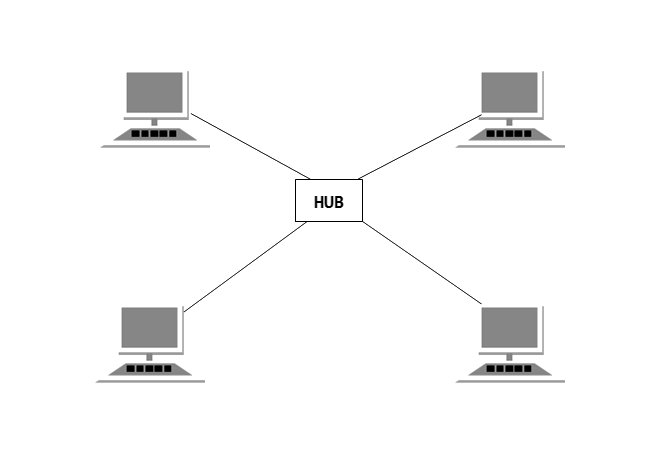
Features of Star Topology
- In a star topology, there is a central communication device (switch or hub), and all devices are connected to it.
- Each device has its own dedicated connection to the central device, which allows for efficient data transmission.
- Star topology is relatively easy to install and requires less cabling compared to some other topologies.
- Data is transmitted in both directions along the connections, and devices take turns transmitting data.
| Advantages | Disadvantages |
|---|---|
| i. Fast performance with few nodes and low network traffic. | i. Performance is based on the hub that is it depends on its capacity. |
| ii. Hub can be upgraded easily, and easy to troubleshoot. | ii. Cost of installation is high, and expensive to use. |
| iii. Only that node is affected which has failed, rest of the nodes can work smoothly. | iii. If the hub fails then the whole network is stopped because all the nodes depend on the hub. |
4. Mesh Topology
Mesh topology is a type of network topology in which each device is connected to every other device in the network. This creates multiple paths for data transmission, ensuring high reliability and redundancy. If one connection fails, data can still be transmitted through other paths.
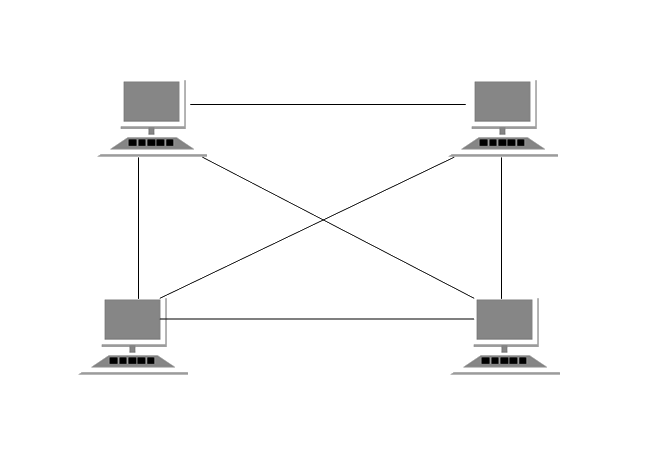
Features of Mesh Topology
- Every device is connected to all other devices in the network through dedicated links.
- Provides multiple paths for data transmission, increasing reliability.
- Highly secure as data travels through dedicated connections.
- Failure of one link does not affect the overall network performance.
- Supports high traffic as multiple devices can transmit data simultaneously.
| Advantages | Disadvantages |
|---|---|
| i. Highly reliable due to multiple redundant connections. | i. Requires a large amount of cabling and ports. |
| ii. Failure of one node or link does not affect the rest of the network. | ii. Installation and maintenance costs are very high. |
| iii. Provides better security and privacy. | iii. Complex setup and difficult to manage. |
5. Tree Topology
Tree topology is a type of network topology that combines characteristics of both star and bus topologies. It has a hierarchical structure where multiple star networks are connected to a central backbone cable. It resembles a tree structure with branches, making it suitable for large networks.
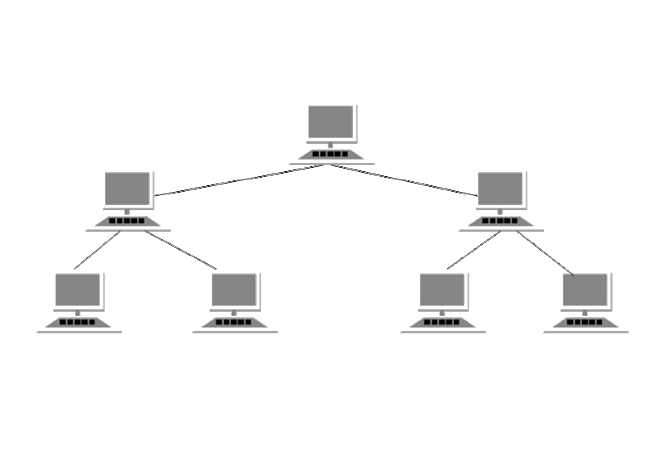
Features of Tree Topology
- Has a hierarchical structure with a root node and multiple levels of connected nodes.
- Combines star and bus topology concepts.
- Each branch can have multiple nodes connected in a star configuration.
- Easy to expand by adding more nodes or branches.
- Used in large networks like organizations and campuses.
| Advantages | Disadvantages |
|---|---|
| i. Scalable and easy to expand. | i. If the backbone cable fails, the entire network is affected. |
| ii. Easy to manage and maintain due to hierarchical structure. | ii. Installation cost is high. |
| iii. Fault detection is easier compared to other topologies. | iii. More complex wiring compared to bus topology. |
6. Hybrid Topology
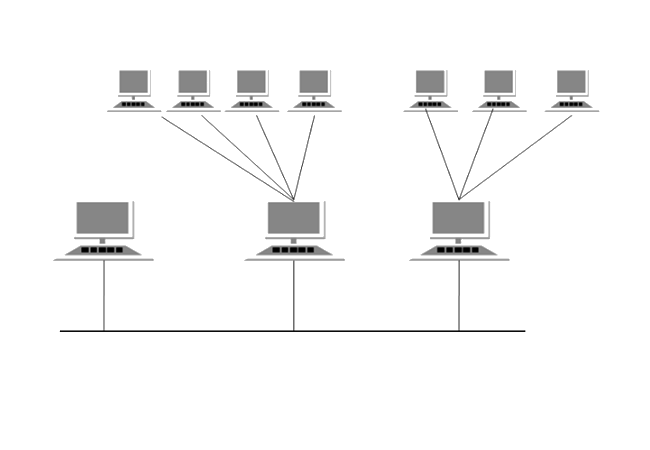
Hybrid topology is a type of network topology that combines two or more different types of topologies (such as star, bus, ring, or mesh) into a single network. It is designed to take advantage of the strengths of each topology while minimizing their weaknesses, making it flexible and suitable for complex networks.
Features of Hybrid Topology
- Combines multiple network topologies into one structure.
- Highly flexible and can be customized based on requirements.
- Used in large organizations where different departments use different topologies.
- Provides improved performance and reliability.
- Supports scalability and easy expansion.
| Advantages | Disadvantages |
|---|---|
| i. Flexible and scalable for large networks. | i. Complex design and implementation. |
| ii. Combines the benefits of multiple topologies. | ii. High cost of setup and maintenance. |
| iii. Reliable and efficient network performance. | iii. Troubleshooting can be difficult. |
7. Point-to-Point Topology
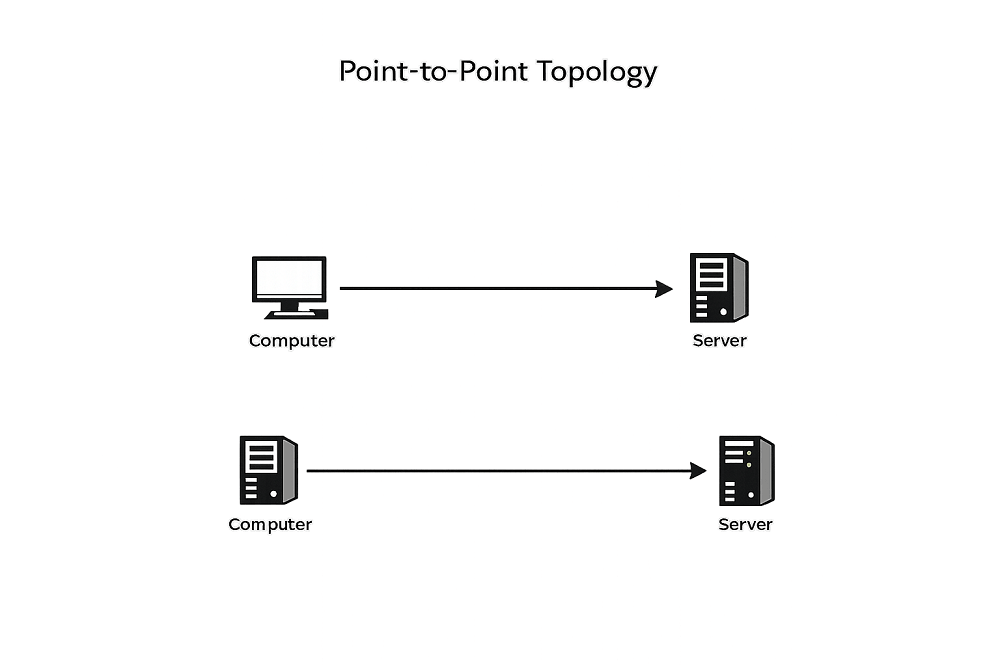
Point-to-Point topology is the simplest type of network topology in which two devices are directly connected to each other through a dedicated communication link. This direct connection allows data to be transmitted quickly and securely between the two devices without any intermediate device.
Features of Point-to-Point Topology
- Connects exactly two devices with a dedicated link.
- Simple and easy to install and configure.
- Provides direct and fast communication between devices.
- Low latency due to no intermediate devices.
- High level of security as the connection is private.
| Advantages | Disadvantages |
|---|---|
| i. Simple and easy to set up. | i. Limited to only two devices. |
| i. High speed and low latency communication. | i. Not suitable for large networks. |
| iii. Secure communication with minimal interference. | iii. If the link fails, communication stops completely. |
Final Thoughts
Network topology plays a crucial role in how efficiently a network performs and how easily it can be managed. Each topology—whether it is Bus, Star, Ring, Mesh, Tree, Hybrid, or Point-to-Point—has its own strengths and weaknesses depending on the size, cost, and requirements of the network.
In modern networking, there is no one-size-fits-all solution. Small networks may prefer simple topologies like star or point-to-point, while large organizations often rely on hybrid or tree topologies for scalability and flexibility. Choosing the right topology ensures better performance, reliability, and future growth.
